
RELIABLE OPTICAL DISC BURNING FOR LINUX
Disc burning you can trust.
Your files deserve more than a simple "burn completed" message.
BurnSure brings disc preparation, optical writing and data verification together in one clear workflow, helping you understand not just whether a write finished, but whether your data can be read back correctly.
Linux desktop application · Command-line tools · SHA-256 verification
A successful write is only part of the story.
Writing files to an optical disc is one thing. Confirming that the recorded information can be read back correctly is another.
BurnSure is designed around this distinction.
From preparing your files to reviewing the final verification result, every major stage of the process is visible and understandable.
Less uncertainty. More insight into the data you've recorded.
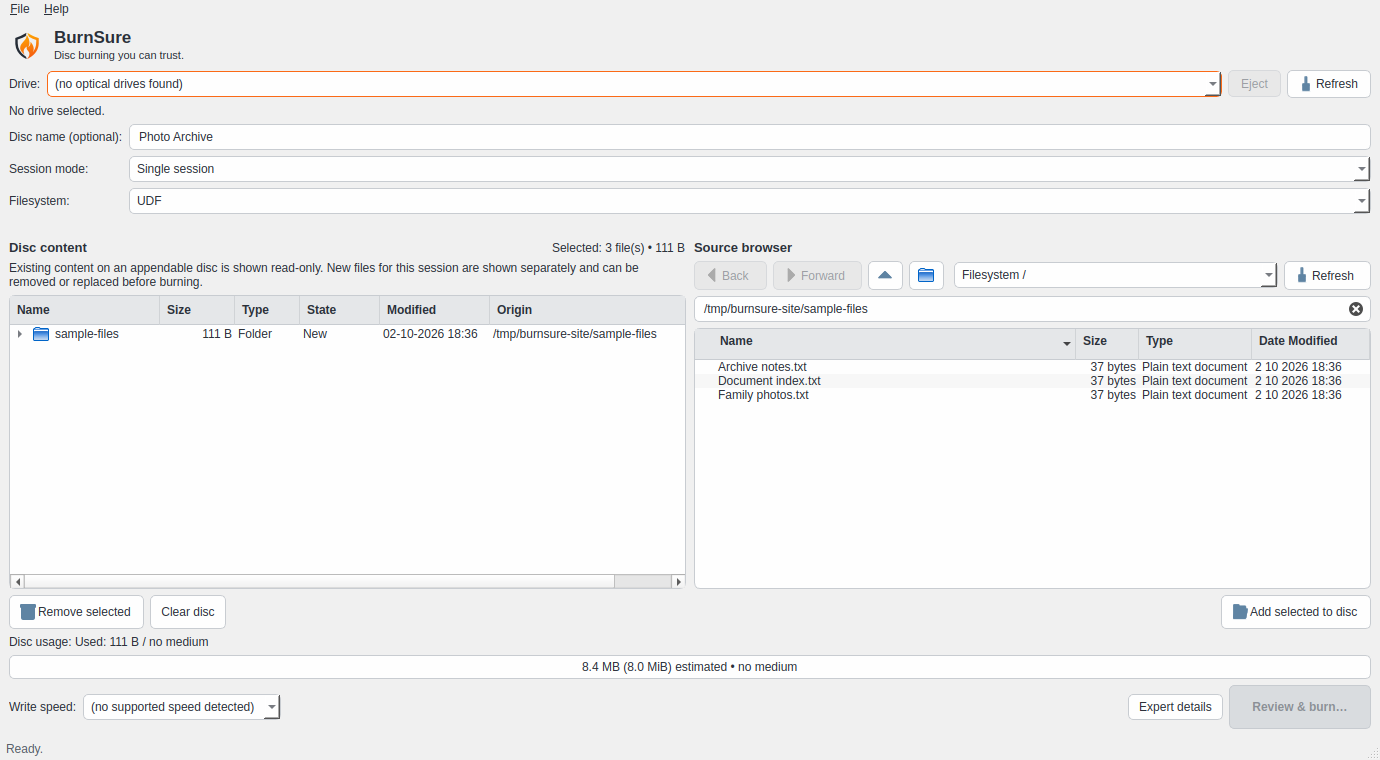
Actual v0.2.0a5 development interface, shown with demonstration files and no connected optical drive.
Everything in one focused workflow.
Prepare with confidence
Organize source files, inspect available media and review your disc project before starting the write.
Verify with SHA-256
Choose complete file verification or a distributed sample for single-session jobs. Understand exactly what has and hasn't been checked.
Stay in control
See the selected drive, supported writing speeds, progress information and final results without unnecessary complexity.
Built for Linux
Use BurnSure through its graphical desktop interface or explore its command-line functionality.
Test before writing
Run the workflow in dry-run mode without writing to physical media.
Transparent diagnostics
Detailed operation logs help make unexpected results easier to investigate.
From your files to a verified disc.
A straightforward process with data integrity at its core.
Select
Choose the files and folders you want to record.
Inspect
Check your target drive, disc capacity and relevant media properties.
Prepare
Build the disc image and establish the selected verification contract.
Write
Record the prepared image using cdrskin/libburn.
Verify
Read the recorded data back and compare it with the original manifest when verification is enabled.
BurnSure keeps the difference between a completed write and a completed verification visible throughout the process.
See how it worksDon't just write it. Read it back.
When your files matter, a completed write alone may not provide the assurance you're looking for.
BurnSure offers multiple verification choices for single-session projects.
Select full SHA-256 verification for a comprehensive comparison, choose a distributed sample when time is limited, or explicitly proceed without verification when readback assurance is not required.
Each option has a different meaning. BurnSure makes that distinction clear.
Understand verificationEXPERIMENTAL DEVELOPMENT
More flexibility for optical media.
BurnSure is also developing true multisession support for compatible appendable media.
The goal is simple: add new sessions to an existing disc while preserving access to previously recorded content.
Current experimental development includes session detection, existing-content visibility, append-position checks and mandatory full verification.
This functionality remains subject to ongoing compatibility and hardware validation.
Explore MultisessionDesigned around what matters: your data.
BurnSure doesn't try to turn optical storage into something it isn't.
It provides a focused way to prepare, write and verify physical media, with transparent results and deliberate user control.
Whether you're preserving a personal photo collection or creating an offline copy of important documents, you should be able to understand what happened during the recording process.
Ready to take a closer look?
Discover how BurnSure approaches optical disc burning, verification and data integrity on Linux.
Get Started Browse FeaturesBurnSure. Disc burning you can trust.